(OHTs) and overhead projector (OHP). Advantages: Transparencies (OHTs) are cheap and easily transferable; Professional OHTs easily prepared on computer; Using a scanner means that it is easy to produce OHTs with pictures and graphics; OHTs can be re-ordered quicker than slides. Disadvantages: Older OHPs are clumsy and heavy to transport; Mostly do not have remote controls; Usually limited to audiences of less than 100, due to poor definition on large screen; Changing OHTs can be clumsy: projector slides are slicker. Videos or video. Advantages: Movement, colour, drama to enhance the presentation; Brings examples impossible by other means -e.g. interviews; Saves time describing processes and experiments; Changes the pace of presentation. Disadvantages: A TV, VCR or film projector is required - these may have to be supplied; If it?s not your own, you?ll need time to familiarise with the equipment; Audience restricted to less than 20; Allow extra time for editing sequence you want. PC or digital projectors. Advantages: Software (for example, PowerPoint) allows preparation of entire presentation - text and graphics; Good-quality graphs, charts, photos, even video sequences are possible; Many commercially available graphics, cartoons and other visuals; Flatbed scanners increase range of available material; Easy to prepare handouts; Laptop computers mean presentation is portable; Corporate presentations can be copied for many presenters: consistency of approach nationwide. Disadvantages: Assumes a good level of computer literacy to use the programs and the equipment; Can take a great deal of extra time to prepare; Costs of computer and peripherals are high; Portable digital projectors are available but expensive if you don?t want to rely on one being provided; Something else goes wrong! For example, power supplies and connectors between projector and laptop: good idea to have back-up; Can easily get in the way of a presentation -audience can be too preoccupied with special effects to notice what you?re saying; Handouts can be a distraction during a presentation -give out at the end. Physical objects or models. Advantages: More immediate than a description or photo -adds credibility; Often easy to collect and display; Large 3d models useful for showing small items, for example, structure of an eye; Can stimulate other sense for audience, for example, smell and texture. Disadvantages: Only effective with small audiences; Can take too long passing objects around; Actual object may be too small to be seen from back of room; Item may be bulky, fragile or too valuable. Slide projectors and slides. Advantages: Clearest and most colourful projected visual aid; Add reality to presentation; Slides are cheap and easy for a good photographer (compared to, for example, a video); Can magnify details ? impossible for OHP or non-projected aids. Disadvantages: Numerous potential technical problems; Needs darkened room, hence slides need to be shown in batches rather than scattered throughout; Danger of obscuring screen when pointing to detail; Slides easily damaged or lost; Easy to get slides wrong way round or upside down (seven ways to load a slide wrongly, one way to do it right!)" longdesc="view.php?id=398876&printable=1&extra=longdesc_id3591600" class="calibre5"/>
Figure 8: Technology choices ? advantages and disadvantagesLong description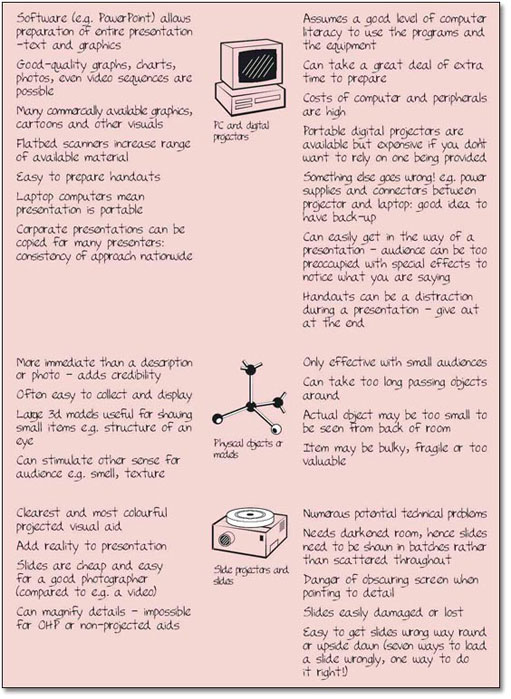
5.3 How to choose
For many of us, how we choose visual aids equipment is largely dictated by what is available and how easy it is to produce suitable material to display with the equipment at a reasonable cost. Where selection is less constrained, it may even be appropriate to use more than one medium, especially for a protracted presentation or one with a great deal of technical or abstract material which benefits from an emphasis on visual stimuli. Generally, though, simple is best and the fewer complications that are loaded onto the inexperienced presenter, the better your chance of success will be. Some of the most interesting presentations I have been to have involved only basic (black on white) transparencies mixed with a talk and plenty of intriguing questions. Conversely, imagine a well-rehearsed talk by an enthusiast on astronomy showing full-colour video clips of stars, planets and asteroids from the Milky Way. It might be just as interesting with basic overheads, but slides which