by The Open University
Available in 42 free installments
Owner:
The most important thing to remember about visual aids is that they should be just that: visual and aids:
visual ? in that they make use of the most effective channel of communication, the sense of sight, not just providing the audience with something to look at, but wherever possible providing them with pictures rather than words.
aids ? in that they should help, not hinder, the speaker in getting the message across, and likewise the audience in receiving and understanding the message.
The primary aim of visual aids is to illustrate the key points that you need to make in your presentation, so with this in mind you need to make sure your visual aids don't have:
too many points on any single slide or OHT ? don't overload
images so shocking or distracting that you lose your audience
complex ideas which cannot be explained to the majority in the time allocated.
The visual aids are there to illustrate your words (and to jog your memory) ? not to tell the whole story. If the aids begin to take over you may well lose the audience's interest in what you are saying as they simply wait for more images.
Figure 9 gets the point across that CD-ROMs can hold much more information than filing cabinets, and that filing cabinets take up more office space than a single CD-ROM. A similar pictorial representation of crushed plastic bottles recycled into a fleece jumper could elicit a favourable response from your audience.
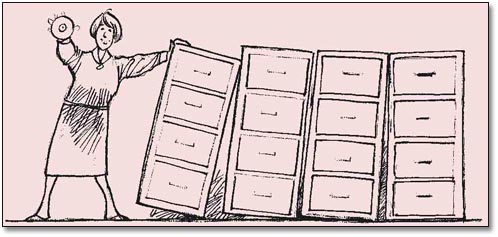 Figure 9: An example of a simple but effective visual messageLong description
You should try to set your image in such a framework as to ask a question, or at least invite your spectators to ask themselves ?Is that really so??
As you probably know, PowerPoint © is only one of many very popular commercial products that can be used to make presentations rapidly. You may have seen it or some other package for some of your own presentations. This unit, we hope, will have helped you to understand and practise the ?basics? in making effective presentations regardless of which ?package? or medium you ultimately use.
In many cases we've observed students, professionals and others using commercial packages which have ignored the important aspects of making sensible visual slides. Of course you can use whatever software (and hardware) you have available and are comfortable with, but don't let technology get in the way of a good presentation! Not only can ?technology? be distracting to the audience, you may distract yourself. Some examples of how this can happen include:
Using too much ?wizardry? such as flying objects, loud sound effects, and animations ? these can be distracting.
Changing fonts, backgrounds, colours or general schemes too often creates a sense of chaos.
Overloading the audience with text, photographs, bullet points or simply producing too many slides for the time allotted will be off-putting.
Great slides or visuals will not be fully appreciated without a strong, enthusiastic speaker who has practised their ?lines? and matched the visuals to their planned text.
Whichever technology package you go for, remember that the same rules still apply.